

Managing Yahoo! Auctions Listings After a Sale or Negotiation
If you receive a purchase inquiry or confirm a sale for a product currently listed on Yahoo! Auctions, please perform one of the following actions via the "Product Management" section on BIGLEMON.
(Please note that if you edit multiple product listings simultaneously, it may take some time for the changes to be reflected on Yahoo! Auctions.)
■ Option 1: Change to "Under Negotiation"
・Change the product price to "Under Negotiation" and leave the Yahoo! Auctions starting price field blank.
(The listing will continue to be displayed on BIGLEMON with the price set as "Under Negotiation".)
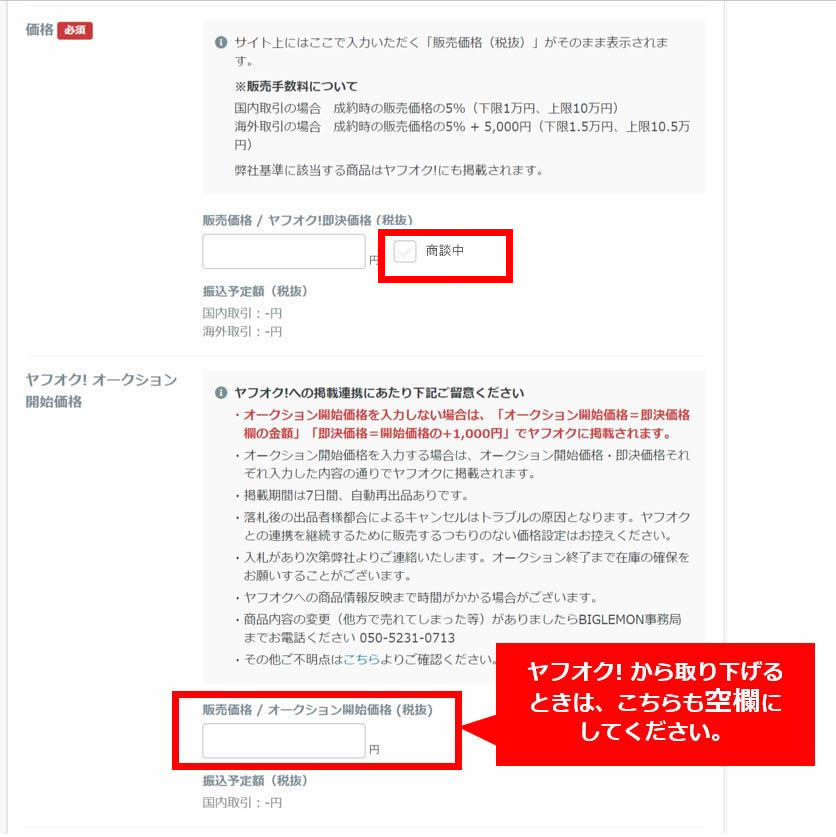
※Please ensure that the auction starting price field is left blank. If it remains filled in, the product will continue to be listed on Yahoo! Auctions.
■ Option 2: Change to "Private" or "Delete"
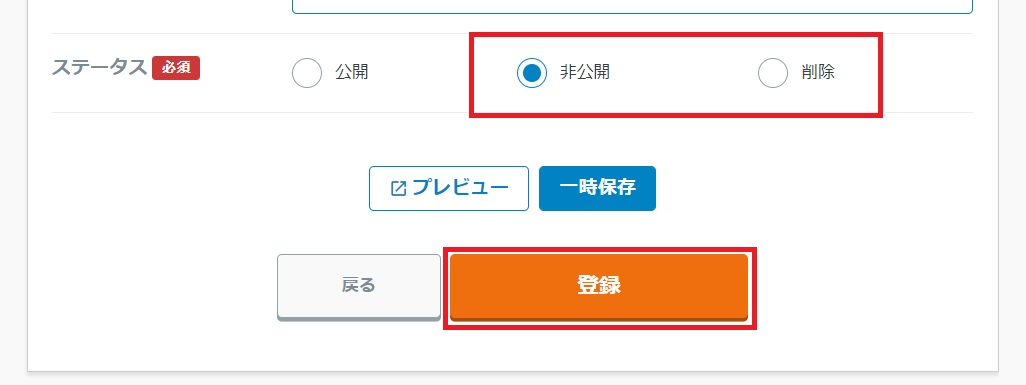
・Change the product status to "Private" or "Delete."
(This will also remove the listing from BIGLEMON. Please note that if you are currently handling inquiries on BIGLEMON, removing the listing will prevent you from continuing negotiations. In such cases, please use Option 1 instead.)
If it is discovered after a product has been won that it is out of stock or cannot be sold due to an ongoing negotiation elsewhere, it will be treated as a cancellation due to seller circumstances, which will negatively impact your rating on Yahoo! Auctions.
We kindly ask for your cooperation in keeping your inventory information up to date.
